Thursday, March 4, 2010

Photo Tips : Rules of third

Introduction
Hello,This is Muerte. Today, I introduce "Rules of thirds" which helps you to arrange a photographic object.

When I try to take or trim a photo, I think " where should I arrange this photographic object?!".

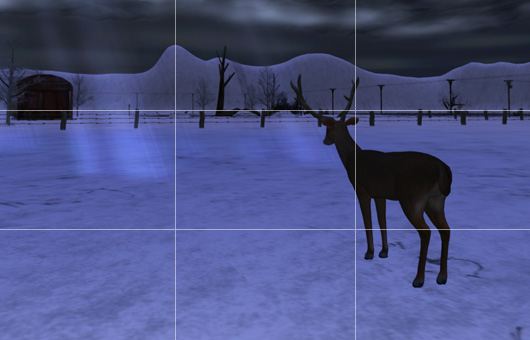
The rules of thirds is good for such situations. This rules means dividing a photo into 3 areas, and arrange a object to the 4 intersections which you like. 4 intersections is below.
3rulesOutline

Try & check
Today's sample photos are below. This photo was taken at "". The SIM looks very cold and some animals like fox were staying. Very calm situation fits the winter image.

This photo is not applied rules of 3rd.
not applied rule
This photo is applied rules of 3rd.
applied rule
The latter photo brings tight images for us. Accordingly like this, rules of 3rd is good & simple way to arrange a object, when you are at a loss what to do.

But this rules isn't almighty. Sometimes, professional photographers don't use the rule on purpose. You have a tight image of a photo, leaving from the rules makes a fantastic photo.

That's all for today, thanks!

Tuesday, March 2, 2010

Photoshop for beginers : retoucing by Lens filter

Hello. This is Muerte. Today, I introduce "how to use Lens filter". This skill is very simple and speedy.

Today's Sample Photo
today, I try to retouch this warm image photo. The original photo is below. This SS was taken at "Isla Menorca". The SIM has warm & blossomed much.
original

1.Select photo layer & click "Lens Filter".
ps

2.adjust slider. & finish.
warmimage

All processes are these 2 steps. This retouching will be very hard & painful if you try without lins filter. Lens filter is useful, because this command don't bother original photo date, so you can change anytime.

Basic use of Lens Filter
Lens filter used to be taken for retouching bad photo image. For example, too obscure sky, very dark sea and more.

Try More!
Some another lens filters are loaded already. You can use another yellow type, blue types and original types which you can select color. Samples are below.
blue

and

green

That's all for today, thanks.
 
Copyright 2009 Shikata. Powered by Blogger Blogger Templates create by Deluxe Templates. WP by Masterplan